
Yes. Side-by-side view and Smart precision are always available. Unified view, word- and character-level precision, syntax highlighting, real-time editing, and merge are free to try and unlimited on Pro.
Compare text
Find the difference between two text files
Compare two text files online
Diffchecker is a free online diff checker for text, code, and data. Paste both versions or drop in two files, and every insertion, deletion, and edit is highlighted line by line, with no install and no account.
Everything in the text diff tool
A full comparison workspace, not just a highlighter. Switch views, narrow the highlight, merge changes, and keep your work.
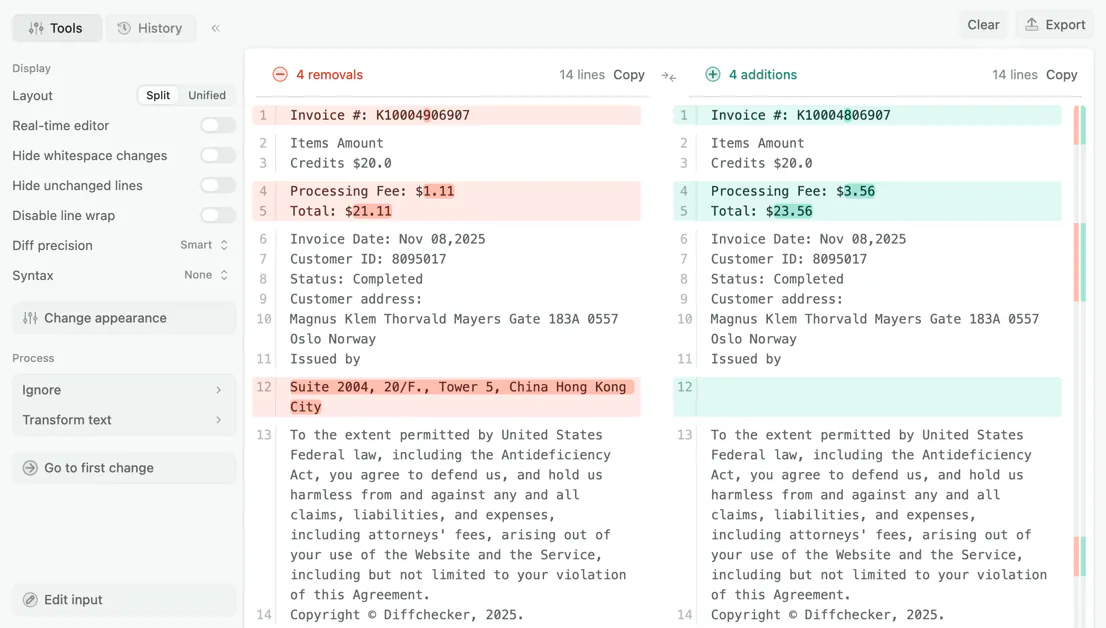
Side-by-side view
The default view. The original on the left, the changed version on the right, removals in red, and additions in green. Both sides scroll together, so you never lose your place in either version.
Unified view
A single column, the same format Git and code review tools use. Free to try and unlimited on Pro.
Custom ignore rules
Tell the comparison what to skip: timestamps, build numbers, session IDs, or any string you choose.
Adjustable diff precision
Smart, the default, picks the clearest highlight for each change: single characters where character level fits, whole words where word level fits. Or lock the whole comparison to either.
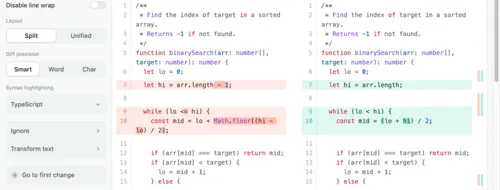
Syntax-highlighted comparison
Colors your code by language while the diff marks it by change. JavaScript, Python, Java, Go, SQL, JSON, YAML, and more.
Real-time editor
Type into either side after comparing and the differences recompute as you go, so fixing what you just found does not mean starting over. Free to try and unlimited on Pro.
Merge changes
Build a combined version by accepting individual changes from either side. Click the arrow on a change to pull it across, and the result updates live in the editor. Free to try and unlimited on Pro.
No sign-up to compare
Paste and compare immediately. An account is only needed to save, share, or upgrade.
No file size limits
Compare long log files and large exports in full.
Share a comparison as a link
Save a comparison and send a URL instead of two attachments and an explanation.
Comment inline
Leave comments on specific lines so reviewers can discuss a change where it happened.
Export as PDF
Turn a comparison into a document you can share.
How to compare two text files online
- 1
Paste your original text
Paste into the left editor, or drag a file onto it. Plain text, code, logs, CSV, and Markdown all work.
- 2
Paste the changed version
Do the same on the right. The two sides do not need to be the same length or the same file type.
- 3
Click Find difference
Every change is highlighted at once: removals in red on the left, additions in green on the right.
- 4
Switch views or export
Move between side-by-side and unified, drop to character level, merge the changes, or export the result as a PDF.
Why Diffchecker?
Most online diff tools are one-shot: paste, compare, and start over if you want to change something. Diffchecker's editor stays live. Fix a typo on either side and the highlighting updates as you type, with your scroll position and view settings intact.
- Real-time re-comparison as you edit either side
- Custom ignore rules to skip timestamps, IDs, or any string you name
- Hide unchanged lines to collapse a long file down to just the edits
- Line wrap toggle for long lines, without horizontal scrolling
- AI difference summary that describes what changed in plain language (Pro)
Encrypted in transit
All traffic between your browser and Diffchecker is encrypted with TLS.
Offline on Desktop
Diffchecker Desktop compares files on your machine with no internet connection.
Independently certified
Your files are handled under an information security program certified to ISO/IEC 27001.
Visit our Trust Center
What people compare with Diffchecker
Developers and engineers
- Compare two versions of a config file before a deploy
- Diff API responses to find the field that changed
- Check log output from two runs of the same job
- Review a code snippet outside of a pull request
Writers and editors
- Compare two drafts and see exactly which sentences moved
- Check a copy edit against the version you submitted
- Spot silent edits between a published article and an archived copy
- Merge feedback from two reviewers into one document
Data and operations
- Compare two CSV exports to find added or removed rows
- Check a reference list against an updated one
- Confirm a bulk edit changed only the records you intended
- Diff two environment variable dumps
What you can compare
Anything stored as plain text. Paste it directly, or drag a file onto either side. The two sides do not need to be the same format.
Plain text and prose
Prose and notes, including text pasted straight from a word processor. Word-level highlighting keeps sentences readable.
- .txt
- .md
Source code
Source files in any language, with syntax highlighting applied on top of the diff.
- .js
- .ts
- .py
- .java
- .cs
- .go
- .rs
- .rb
- .php
- .swift
- .kt
- .sh
- .sql
Data and config
Structured config and data files, where custom ignore rules matter most.
- .json
- .xml
- .yaml
- .toml
- .env
- .csv
- .tsv
Logs and output
Application output and test results, where hiding unchanged lines collapses a long file to the part that diverged.
- .log
- .out
- .err
No file size limit. Large inputs take longer to render in a browser, and Diffchecker Desktop is faster because it runs locally.
Getting a cleaner comparison
Most comparisons that look wrong are not wrong. They show real differences you did not care about, and bury the ones you did.
Everything is highlighted
Turn on hide whitespace changes. A comparison that is entirely red and green is nearly always line endings or indentation rather than content, usually a Windows and Mac pair, or a paste that converted tabs to spaces.
The same noise on every line
Add a custom ignore rule for the repeating pattern. Logs and generated files carry a timestamp or a build number on every line, so every line differs even when nothing changed.
A long file with a few changes
Turn on hide unchanged lines. It collapses the untouched sections, which usually reduces a several-thousand-line comparison to a screen or two.
A change you can see but cannot locate
Switch to character level. Word level tells you a token changed; character level shows you which character, which is what you want for identifiers, hashes, and currency amounts.
Blocks that moved rather than changed
Compare the two blocks on their own in a second comparison. A relocated section reads as a deletion in one place and an insertion in another, and this confirms whether it moved or was rewritten.
Trusted by teams and independently certified
- Intuit
- Lyft
- National Geographic
- Salesforce
- The Wall Street Journal
- Congressional Budget Office
- Zoom
- Dow Jones
ISO/IEC 27001 certified
Our information security management system is independently audited and certified. View the certificate in our Trust Center.
“We're doing a large-scale migration at Airbnb and our entire team uses Diffchecker to ensure that we don't introduce diffs in the new output. The UX for finding diffs is the best we've found across all the diff checking tools. Our most used feature is the ability to save and share diffs, which helps us easily share diffs for debugging and issue tracking.”

Zhi PanSoftware Engineer, Airbnb
Frequently asked questions about comparing text
The comparison runs in your browser, and nothing is published or shared. Nobody else can see it unless you save the comparison and share the link. Diffchecker Desktop runs the same comparison offline.
No file size limit. Very large files take longer to render, and Diffchecker Desktop is faster because it runs locally.
Smart, the default, chooses the clearest level for each change: single characters where a character-level highlight fits, whole words where a word-level one reads better. The fixed levels apply one rule everywhere instead. Word level always marks whole words as changed, which reads best for prose. Character level always marks the exact characters that differ, which is what catches a single transposed digit, such as INV-2026-0431 against INV-2026-0413. You can switch levels at any time without recomparing.
Yes. Ignore whitespace and case changes, or add a custom ignore rule for any string, which is useful for timestamps, build numbers, and session IDs. You can also hide unchanged lines.
Yes. Save a comparison to get a link you can send, and reviewers can leave inline comments on specific lines. Saving requires a free account.
Diffchecker Desktop runs the same comparisons entirely on your computer, fully offline. Nothing you compare ever leaves your machine, which matters for contracts, client data, and code you cannot paste into a website. It is also faster on very large files, and it adds folder comparison.
More ways to compare with Diffchecker
Compare documents
Compare Word documents, PDFs, and presentations, including a PDF against a Word file, with formatting and moved-content detection.
Compare images
Nine comparison modes including slider, fade, flicker, and pixel subtraction, with automatic alignment.
Compare spreadsheets
Compare XLSX, XLS, CSV, TSV, and ODS files cell by cell, with formula change detection.
Compare on the desktop
Compare whole folders and work fully offline on Windows, Mac, and Linux with the desktop app.
Compare without the browser
Diffchecker Desktop compares text, documents, images, spreadsheets, and whole folders on your machine, offline.
Try for Free!
14-day trial
No credit card required